
Moving your library from the home area to C
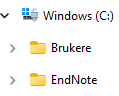
First, create a folder under C named EndNote:
Find your library and mark both the .enl file and the data folder. These two belong together and must always be stored in the same place:
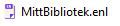
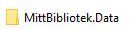
The next time you want to open your library, you must go to File in the EndNote menu and choose Open Library. Find the library at its new location on C.
Backup of the library to OneDrive
Remember that you must move the backup library to C if you need to open it!
First, create a folder in OneDrive named EndNote backup:
Open your EndNote library and click on File in the menu and then on Compress Library (.enlx). In the box that appears, leave With File Attachments and All References in Library checked and click on Next:
In the next box, find OneDrive, mark the EndNote backup folder and click on Open and the Save: